
Partners
If you are one of the following types of partners, you can use the user authorization.
- Introducing Brokers
- Platforms that require users to complete authorized operations
Authorization Code Flow
Authorization Code Flow is intended for the App to access protected resources on the resource servers on behalf of the user,
as described in Section 4.1 of RFC6749.
The Authorization Code Flow has two steps.
First, the App redirects the user's browser to the Authorization Endpoint with client_id, redirect_uri, scope, audience and other parameters to request the user's authorization.
If the user has not logged in to Tiger's website, the Authorization Server will redirect the user's browser to Tiger's login page, and then return to the Authorization Endpoint after the user logs in.
After the user authorizes the App, the Authorization Server redirects the user's browser back to the redirect_uri under the App's domain with the Authorization Code code.
The App's front page should then pass the code to the App's server.
The App server then requests the Token Endpoint with the Authorization Code and client credentials to obtain an Access Token.
Authorization Request
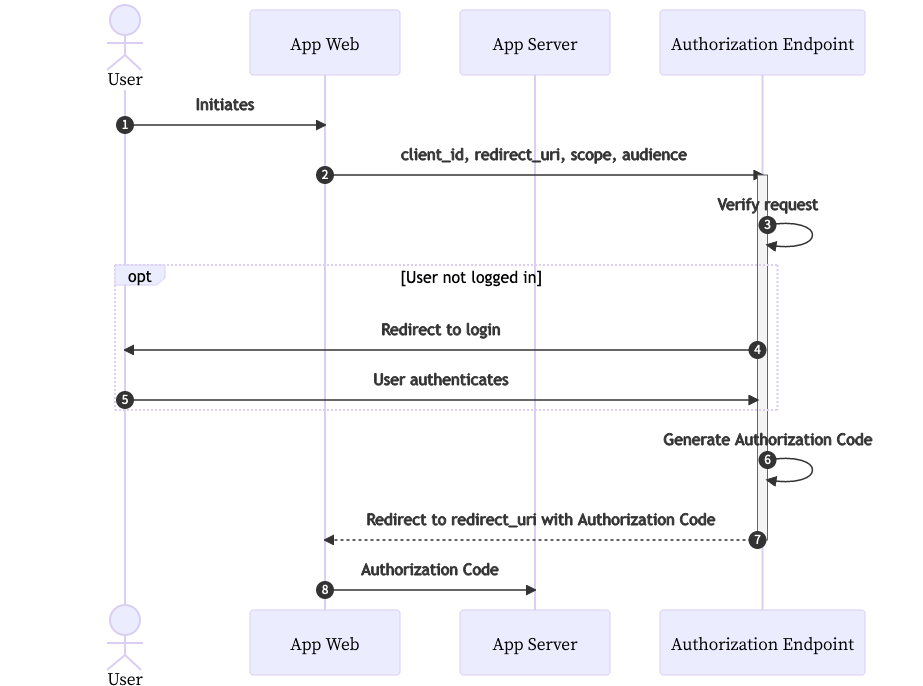
- After the user initiates the request,
- The App should direct the user's browser to the Authorization Server's Authorization Endpoint to begin the Authorization Code flow.
- In the request, the
response_typeparameter must be set tocodeto indicate that the App expects to receive an Authorization Code upon a successful request. The App must also provide itsclient_id, requestedscope, and requestedaudiencein the request. - The App must also provide a
stateparameter to store request-specific data and/or prevent CSRF attacks. The Authorization Server will return the unmodified state value back to the App when redirecting. - The request can also contain an optional
redirect_uri. If not provided, the Authorization Server will redirect to the first URI in the pre-registeredredirect_urislist.
If provided,
redirect_urimust EXACTLY match one of the URIs registered during App registration. The Authorization Server will REJECT the request if it does not match any. - In the request, the
- Upon receiving the request, the Authorization Server will first verify its validity — i.e., the App indicated by
client_idexists, every requestedscopeandaudienceis pre-registered, and theredirect_uriis legitimate. - Then the Authorization Server will ask the user to log in and, optionally, approve the requested scopes and audiences.
- The Authorization Server will then generate an Authorization Code.
- The Authorization Server will redirect to
redirect_uriwith thecode, grantedscope, andstate.- If
response_modeis provided in the request, the Authorization Server will construct the redirection using the requested mode.
- If
- The App should then pass the
codeto its server to initiate a token request.
Error Response (Same as described in the API document)
If the client_id does not exist, or the redirect_uri is not valid, the Authorization Server will display the error to the user without redirecting back to the App.
If any other error occurs, the Authorization Server will redirect back to redirect_uri with error, error_description, and state parameters.
If response_mode is provided in the request, the Authorization Server will construct the redirection using the requested mode.
The explanation of errors are as described in Section 5.2 of RFC6749.
Token Request
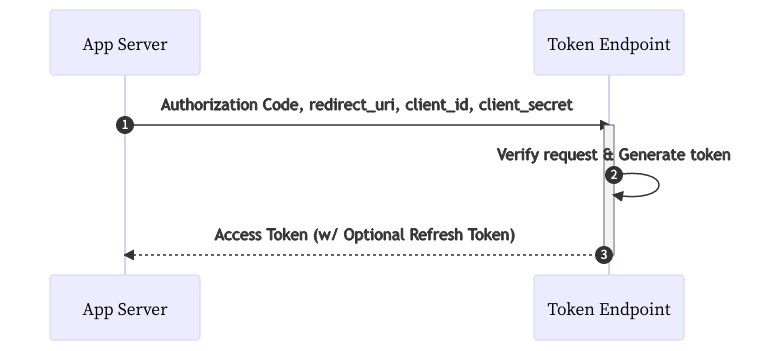
- The Authorization Server will verify the request — i.e., the App successfully authenticates itself, the
codewas issued to the same client, the code has not been used, and theredirect_urimatches the one in the initial authorization request. - Then the Authorization Server will generate an Access Token, the form of which is described in Section Access Token.
- If the
offlinescope was granted during the authorization request, the Authorization Server will also generate a Refresh Token, which can be used to refresh the Access Token via the Refresh Token Flow.
- If the
- The Access Token and the optional Refresh Token will be returned to the App as described in the Token Endpoint API document.
Refresh Token Flow
If a Refresh Token is issued to the App along with the Access Token, the App can use the Refresh Token to obtain a new Access Token and Refresh Token pair at the Token Endpoint, either before or after the Access Token expires.
The Refresh Token also expires after a certain period, but the expiration duration of a Refresh Token is much longer than that of an Access Token.
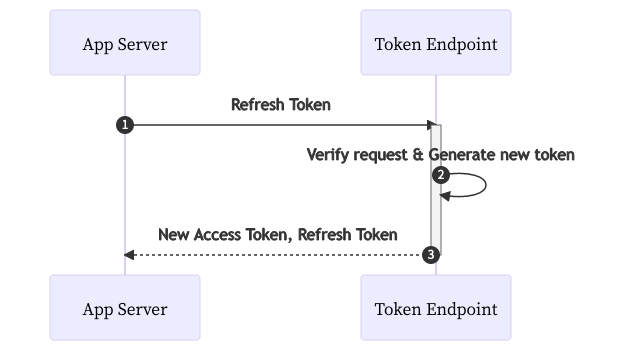
- To request a new Access Token and Refresh Token pair, the App server should send a request to the Token Endpoint.
- In the refresh request,
grant_typemust be set torefresh_token, and the Refresh Token should be provided via therefresh_tokenparameter. - The App also needs to authenticate itself by one of the methods explained in Section Authentication Method.
- In the refresh request,
- After validating the Refresh Token (is active and was issued to the App) and authenticating the App, the Authorization Server will generate a new Access Token and Refresh Token pair. The scopes and audiences of the new Access Token will be the same as those of the original token.
- The new Access Token and Refresh Token will be returned to the App as described in the Token Endpoint API document.
- The original Access Token and Refresh Token will be IMMEDIATELY revoked and no longer usable.
Additional Security Measures
- Authorization Code Reuse
If an Authorization Code is used more than once, EVERY issued Access Token and Refresh Token that is associated with the code will be revoked.
- Refresh Token Reuse
If a Refresh Token is used more than once, EVERY issued Access Token and Refresh Token that is associated with the token will be revoked.